This guide reflects the tax changes recently announced, which will be effective January 1, 2026. Once you have performed all the modifications described in this article, we recommend using the Payroll Deductions Online Calculator - PDOC, to verify the results from your payroll journal. Please remember when doing so to select the correct number of Pay Periods in the year (26 or 27).
TABLE OF CONTENTS
- Tax Changes Import
- Manual Configuration
- Federal and Provincial table
- CPP and EI table
- Tax Credits
- Claim amounts by territory table
- Support
- Sources
Tax Changes Import
This year we have prepared a Configuration Package so you can save time updating the brackets. In case you would like to do it manually please skip to the section Manual Configuration. To import and apply the configuration package follow the instructions below:
- Download the attachment at the bottom of this article.
- Go to NAV and search for Configuration Packages.
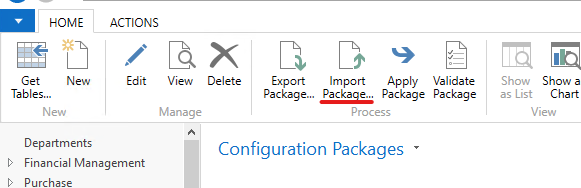
- On the action bar, click Import Package
- Open the file you just downloaded and wait for the import to finish
- Select the configuration package called Brackets and verify that it contains 45 records. If that's the case click Apply Package and then Yes.
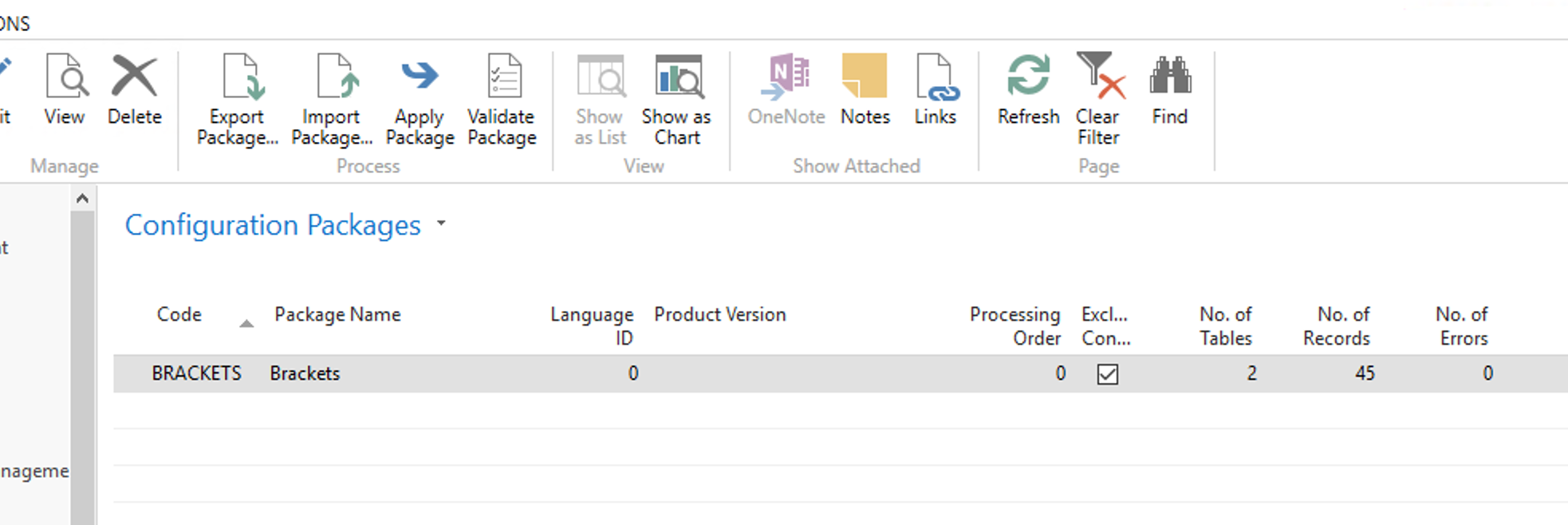
- You should receive a pop-up confirmation message indicating that 2 tables were processed and no errors were found. If that's not the case, please contact Support to investigate it.
Once you have completed this process, the only step missing would be to perform the Mass Tax Info Update for all employees as described below.
Manual Configuration
NOTE: FOR EACH OF THE FOLLOWING CHANGES, WE WANT TO CREATE A COPY OF THE 2025 CONFIGURATION WITH A NEW EFFECTIVE DATE OF 01/01/2026
As an example:
- In NAV 2016 and previous versions, navigate to Brackets
- Find FED TAX and select it.
- Use the buttons at the Action Bar to Copy
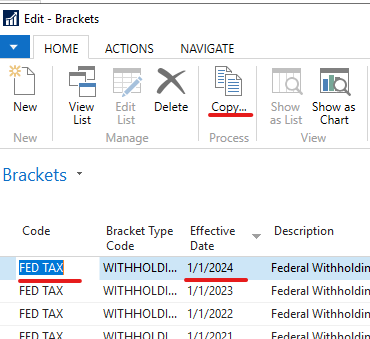
- Create a copy with Effective Date 01/01/2026
- Select the newly created Bracket, and click Navigate > Details to modify the records as indicated in the table below.
- Repeat this process for all the brackets mentioned in the tables below.
Federal and Provincial table
| Bracket | Amount Over | Tax % | Tax Amount | Limit | Max W/H |
| FED TAX | 0 | 14 | 0 | 0 | 0 |
| 58,523.00 | 20.5 | 8,193.22 | 0 | 0 | |
| 117,045.00 | 26 | 20,190.23 | 0 | 0 | |
| 181,440.00 | 29 | 36,932.93 | 0 | 0 | |
| 258,482.00 | 33 | 59,275.11 | 0 | 0 | |
| FED LOW RATE | 0 | 14 | 0 | 0 | 0 |
| CPP LOW RATE | 0 | 11.64706 | 0 | 0 | 0 |
| ON TAX W/H | 0 | 5.05 | 0 | 0 | 0 |
| 53,891.00 | 9.15 | 2,721.50 | 0 | 0 | |
| 107,785.00 | 11.16 | 7,652.80 | 0 | 0 | |
| 150,000.00 | 12.16 | 12,363.99 | 0 | 0 | |
| 220,000.00 | 13.16 | 20,875.99 | 0 | 0 | |
| ON SURTAX | 5,818.00 | 20 | 0 | 0 | 0 |
| 7,446.00 | 56 | 325.40 | 0 | 0 | |
| MAX EMPLOYMENT CRED | 0 | 0 | 0 | 1,501.00 | 0 |
| MB TAX W/H | 0 | 10.8 | 0 | 0 | 0 |
| 47,000.00 | 12.75 | 5,076.00 | 0 | 0 | |
| 100,000.00 | 17.4 | 11,833.50 | 0 | 0 | |
| AB TAX W/H | 0 | 8 | 0 | 0 | 0 |
| 61,200.00 | 10 | 4,896.00 | |||
| 154,259.00 | 12 | 14,201.90 | 0 | 0 | |
| 185,111.00 | 13 | 17,904.14 | 0 | 0 | |
| 246,813.00 | 14 | 25,925.40 | 0 | 0 | |
| 370,220.00 | 15 | 43,202.38 | 0 | 0 | |
If your province W/H brackets are missing please create a ticket with Support so we can update the data.
CPP and EI table
| Bracket | Amount Over | Tax % | Tax Amount | Limit | Quantity |
| CPP2 LIMIT | 0 | 0 | 0 | 0 | 10,400.00 |
| CPP/QPP W/H | 3,500.00 | 5.95 | 0 | 4,230.45 | 0 |
| CPP/QPP W/H-2 | 0 | 4 | 0 | 416.00 | 0 |
| CPP/QPP MAX | 0 | 0 | 0 | 74,600.00 | 0 |
| CPP/QPP MAX-2 | 0 | 0 | 0 | 10,400.00 | 0 |
| CPP LIMITS | 3,500.00 | 6.4 | 0 | 4,230.45 | 0 |
| CPP/QPP LIMITS | 3,500.00 | 5.95 | 0 | 4,230.45 | 0 |
| EI LIMITS | 0 | 1.63 | 0 | 1123.07 | 0 |
| EI W/H | 0 | 1.63 | 0 | 1123.07 | 0 |
| EI MAX | 0 | 0 | 0 | 68,900.00 | 0 |
Tax Credits
In order to update the Tax Credit amounts for all employees we need to follow the next steps:
- In NAV, search for Mass Employee Tax Info Update.
- If you want to first run a test report leave the option Test Print enabled, if not, disable it.
- Enter the effective date of 01/01/26, reporting authority and amounts for the old and new credits.
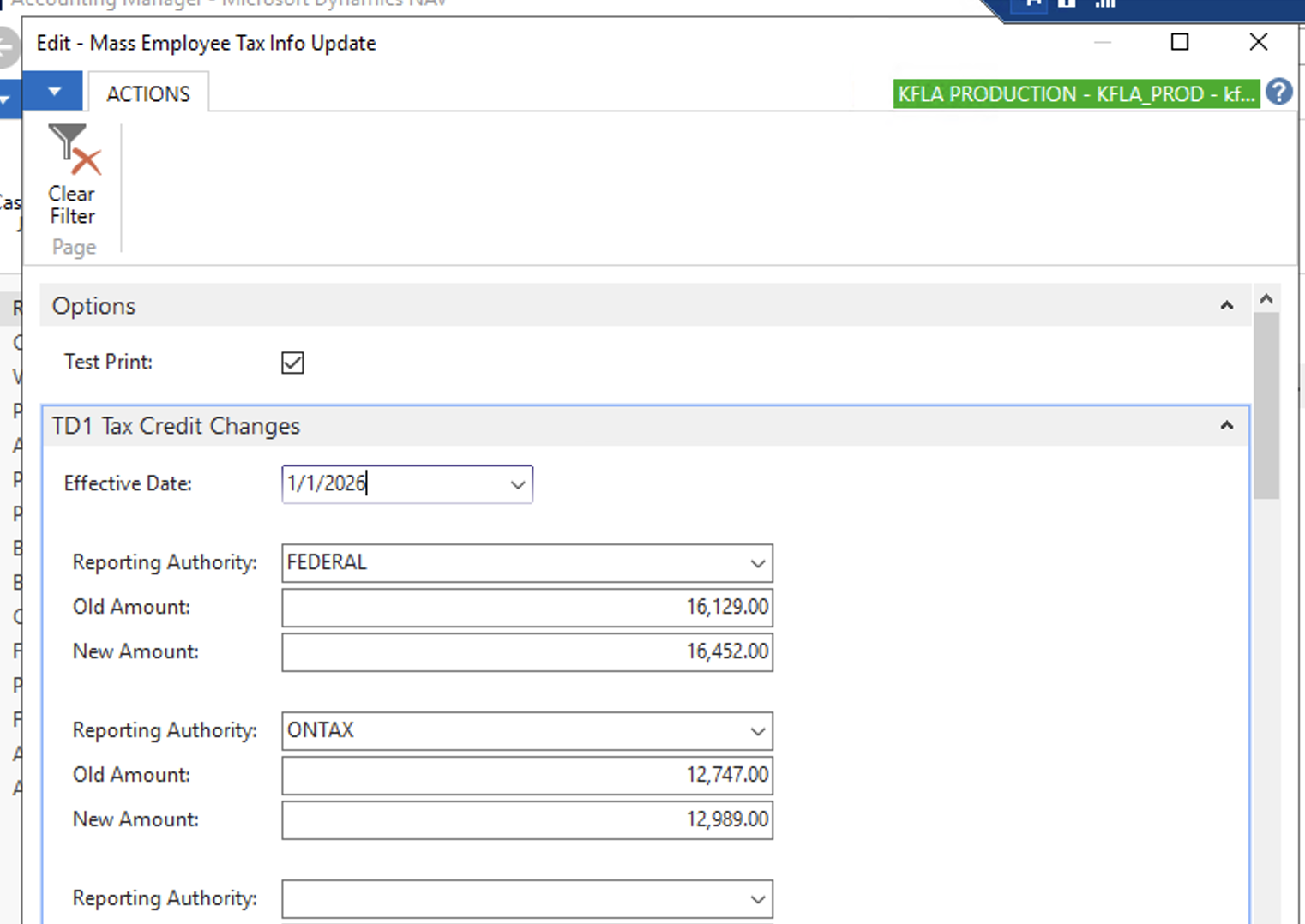
- Click Print and select PDF.
- Check any employee's Tax Auth. Info and verify the 2026 records are listed.
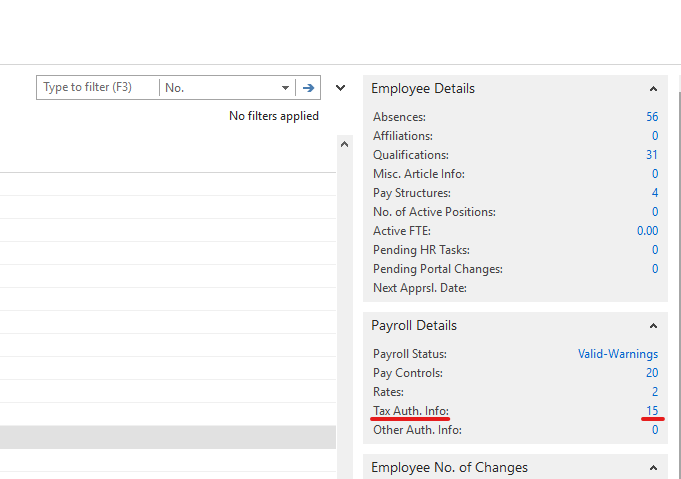
- Modify manually any employees Tax Auth. Info where the TD1 Form Claim Amount differs from the Basic Personal Amount.
Claim amounts by territory table
| Territory | Total claim amount |
| FEDERAL | $16,452.00 |
| ONTARIO | $12,989.00 |
| ALBERTA | $22,769.00 |
| MANITOBA | $15,780.00 |
| NOVA SCOTIA | $11,932.00 |
| BRITISH COLUMBIA | $13,216.00 |
Support
Our support team is available for any questions or concerns that may arise during this process. If you encounter discrepancies while comparing results to the Payroll Deductions Online Calculator - PDOC please create a Support ticket and schedule a call with our Support Engineer, Gianfranco Montesanto, using the following link:
Select a Date & Time - Calendly
Sources
Payroll Deductions Formulas - 122th Edition Effective January 1, 2026 - Canada.ca
Was this article helpful?
That’s Great!
Thank you for your feedback
Sorry! We couldn't be helpful
Thank you for your feedback
Feedback sent
We appreciate your effort and will try to fix the article